
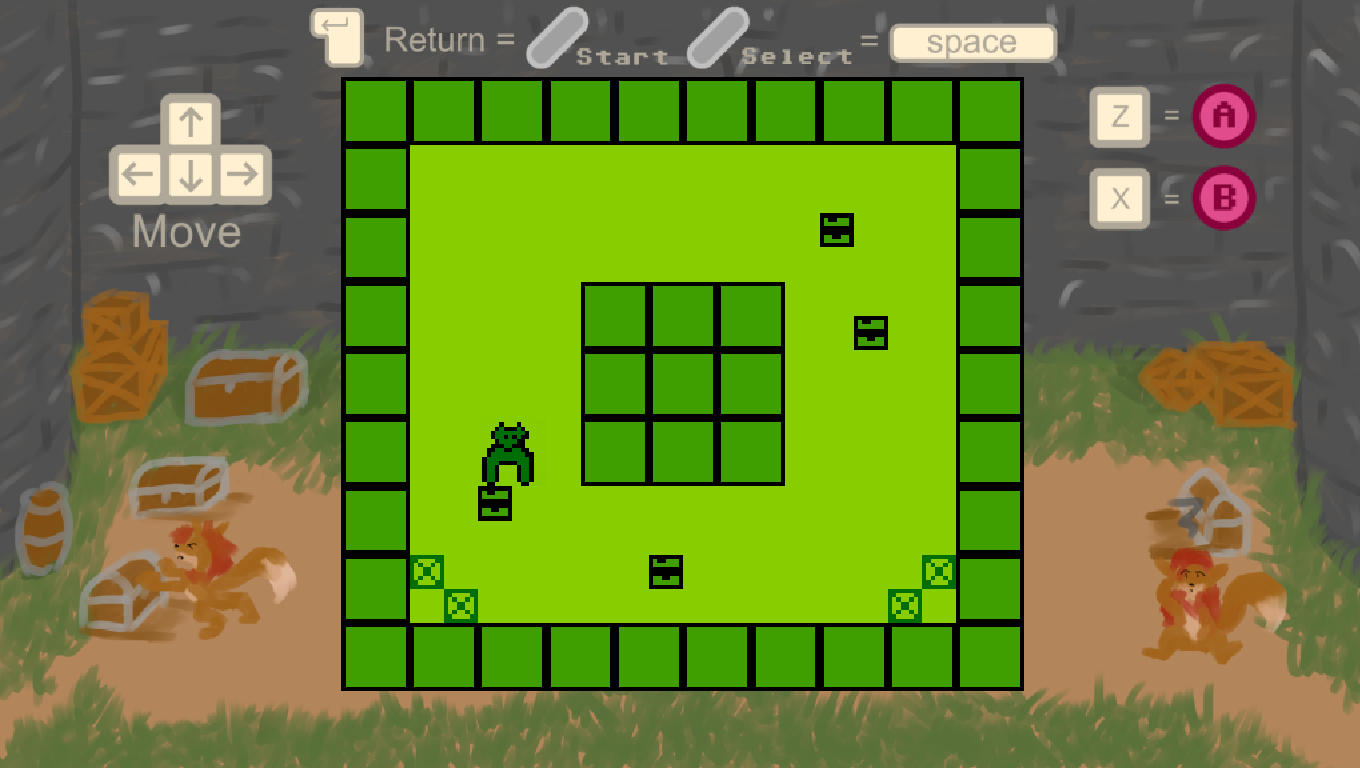
Screenshot of the finished game, showcasing a level and gameplay centered, surrounded by a bezel/border.
Hello and welcome to my devlog for Treasure Shove. My entry into GB JAM 14, and one where I showed once again just how original I am at coming up with concepts by emulating Sokoban. Yeah, I could say that no, I was actually trying to make a game based on that ONE joke mechanic in Undertale (read, the talking rock in Ruins), I could pretend that I had no idea what I was doing but, while that would be hilarious it’s also a very tired trope. No, it’s Sokoban. You push boxes. The boxes end up in places, locked up, and the challenge is how you navigate the movement to try and get them placed where you want. It’s not a new concept, but could I still execute it well? I was curious to try and find out.
GB JAM, or Gameboy Jam has become THE game jam I have to participate in every year. When I first joined in 2023, it represented the first creative thing I did with my then new partners. We had been dating only a few months and I had just moved in with them. The fact I was actually in a psych ward by the time of the jam’s start meant very little. Using their custom framework (or Engine), written in Monogame, I literally drew out sprites in a grid of 8 by 8 squares that I made using pen, paper and a ruler while visiting the “grippy socks club”, as I am informed the internet likes to call that particular space. I had started working on my trauma, partially the reason why I was there but the future looked bright and I looked forward to my partners visiting every day so we could work on it together. I did not consider myself a programmer, not really, much less one that knew C# or any “real language” but I felt like I was contributing and like I was an equal part of the team. I not only contributed the graphics, I contributed game design and help shape up gameplay.
In 2024, with a partner burnt out me and my other partner (for we lived together the three of us) embarked on an even more ambitious project. I must have been very convicing, or she must have really liked the project because we ended up making a faux 3D game based on the Mansion of innsmouth Virtual Boy game. In 10 days using my most feared, and most fiercest of enemies, Arrays and tricks so as to change how a sprite looks based on “Proximity” we created a realistic 3D looking game the like of Faceball 2000. All with the same 160 x 144 resolution. The same 4 colors on screen at one time, the same A, B, Start, Select and D-pad (or cross as I’ve heard some people call it incorrectly). We had established the desire to make games commercially at some point and this was where I got my first taste as a producer. Writing out tasks per day, and managing the work and making sure my partner didn’t hyperfocus away the afternoon and stopped eating and drinking. Although I had experience as a project manager in translation agencies (because hey, wasn’t this blog talking-translation once about translation?) it was still a learning experience. It was also a gamejam where 3 separate people who wanted to do music for us dropped out and I had to learn to manage volatile emotions and rsd. That feeling of whatever, I don’t care. More team mum than middle manager, but a learning experience nevertheless.
And then we broke up. Of course. I’ve written tens of thousands of words about my 2025, and if I were smarter at this whole SEO thing I would probably link to that whole post about everything I did in 2025, 10 thousand plus words and all, but suffice it to say it was a complicated year. Though I did much in 2025, I was without a laptop except for a chromebook, which wasn’t ideal for programming and I missed making things. I knew of course that I would not have access to the PRINCESS framework, that my exes had developed and kept, just as they had kept the cat I still dearly miss daily, but I had been making my own little games in GameMaker and I thought to have been getting better at it. I had been joking about life, society and the struggles of being trans and trying to find work in gamedev with some friends for months. I had even offered to and translated a previous jam game of theirs. We were close and I had convinced them to work on the game jam with me. We ended up making a METAL GEAR parody (and since I said METAL GEAR, I have to now scream METAL GEAR? METAL GEEEEEEEEEEAR).
It didn’t rank very high. It was submitted the literal last minute of the jam and within 5 minutes people found a way to go out of bounds and sequence break. It didn’t matter, though we would later fix it to the best of our ability, the game jam had always been more about testing how well we worked together than anything else. It was the gamejam that proved that I belonged in, and was now a part of Atelier Cassette. How well did the game concept go? It was enough to make me post again on this blog after a hiatus of nearly two years, and though the commercial version of the game jam is shelved for now, 13 or 14 weekly devlogs in, it’s still a project I aim to return to at some point. I did the graphics and music for the original jam version and a lot of the art for the in hiatus commercial version of Stealthy Dicey DX. Again, I don’t care about SEO but you can find it all around here somewhere in this blog.
Other jams were my first, DiscoDevs, a gamejam by disabled people and where I have found a community I really enjoy. One where I can just be disabled without judgement. The Girly Game Jam where I have made a very close friend and where the art shone above it all. Hell I went from making 4 games solo across the entirety of 2023 and 2024 to making like 5 games this year alone. But it didn’t matter. Gameboy Jam, the jam I hadn’t missed in 3 years despite EVERYTHING going on in my life was, to me, THE game jam, notice the capital letters. And if I could use it to see how well I matched with a friend I had been shamelessly flirting with, enjoying their furry art while denying being a furry? Well that was even better!
But I am writing this assuming that whoever has stumbled upon this blog actually cares about my stories. It might be that you opened up this not knowing who I am or not caring, and just want to know how I did Sokoban. In that case reading through 1200 words of preamble before we even get into any code or graphics is sure to have been upsetting. Then again maybe people who want the code only skipped ahead. That is why I have sections isn’t it?
So without further ado. Treasure Shove. My oh so original idea! And yeah I’m rolling my eyes too!
Okay no, I lied, why Sokoban (code soon I promise)
Sokoban is one of those games I found myself playing quite often. Though every single Playstation game I owned seemed to have box pulling puzzles, from Treasure Planet to Legacy Of Kane: Soul Reaver, and hell if Raziel wouldn’t influence the look of my Ocs and aesthetics for years Sokoban was something I associated not with my console games but with my PC.
It was a platform I didn’t really use for gaming that often, at least in the traditional sense where you’d buy a cd game at a store and play it. Though I had a series of Disney games that, for some reason I got at STAPLES for like 2.99 the pc was far more the place where I’d play compilations of shareware or freeware titles. Small, lightweight, often coded in Visual Basic. I’ve written before about the type of game that comes in Digerati compilations and have, indeed, even made and created my game in the same style. Joana’s Garden, my love letter to the genre is one that I have written about making in this very same blog.
That is to say that while I saved 3D games for my Dreamcast or original Playstation, because even when the PS3 was about to come out my family was still working class enough to not afford the PS2 the PC was mostly the realm of free web based games. Shockwave, Flash, or Visual Basic games coded quickly and cheaply. Often with associations to other brands. And although it’s probably a kinda crappy idea to place on my actual professional blog that yes I was a filthy little pirate, and had a copy of Visual Boy Advance with hundreds of roms that type of game provided something that was far less structured. I went to my illegal, illicit, immorally sourced set of GBA roms when I wanted something to fill an an afternoon, but I returned to Elf Bowling 2 when I wanted to waste 5 minutes.
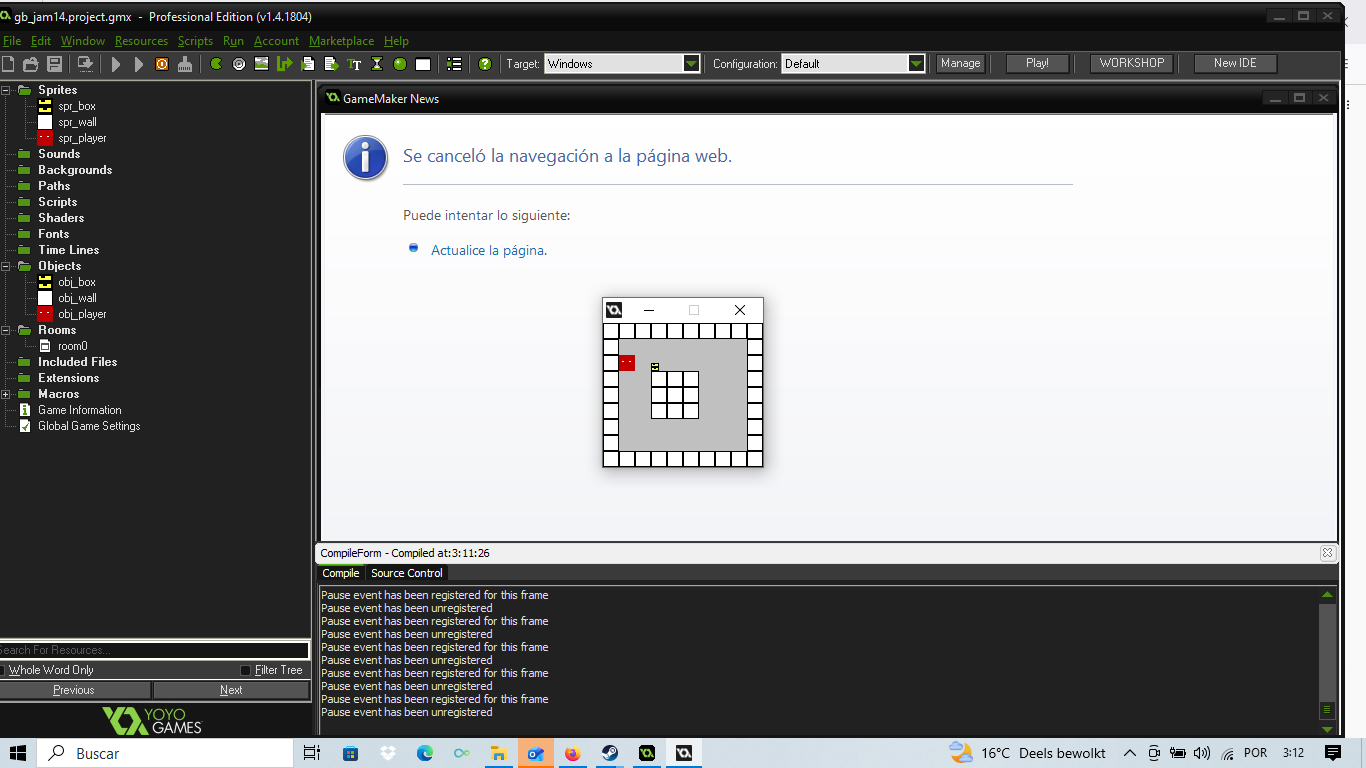
An early version of sokoban is shown on screen. Sprites are simple squares, and the entire game is 160 x 144 resolution, so it looks like a postcard, small and centered on screen.
It’s so in this context that SOKOBAN enters the scene. It might have been an easy type of game to make. I do not know. Prior to starting this project I had no idea how to do it. While I had been told I was rather good at logic and figuring out how to reverse engineer games, even in the midst of panic as seen with my Jogo de Saltar remake I hadn’t yet thought how to do it. But Sokoban had been in my mind for a while. Even if I had no idea how cheap or easy it was to make in code I knew one thing, I had played dozens of variations of it back in the day. Some were good, some were bad, some ignored the grid like design and allowed continuous movement. Some forgot that you needed to reset the scene after messing up and you had to restart the entire game by closing the window even if you were 10+ levels in. My previous two games made, Bouncy Bouncy Penguin and Jogo de Saltar remake had already been ambitious. I had just “made” a platformer. So how hard could Sokoban be? I just hoped it didn’t have my big, mortal enemy and personal pet peeve. Arrays.
We did Sokoban WITHOUT arrays, yes, I know, sad.
So…It turns out when I went to look for how to make Sokoban, get an idea on how to represent the logic and graphics and stuff, people universally held the same opinion. Just use an array to represent data. Use an array to represent walls, use an array to do coordinates so you can know exactly where you are, and where the boxes are….Sokoban, it turns out is not only a game that relies on Arrays. It’s THE arrays game. I could not have picked a worst game to want to remake. No, seriously. I cannot overly emphasise how much the internet and fellow game dev friends were telling me to use arrays and a coordenate system.
The traditional way to do Sokoban, it turns out, has you have a 2D array, and updating that to indicate where you stand. You’d have something like [0, 2] to indicate that the player is standing on the top row, second collumn and treat each button press as updating that. So you’d press right and you’d have player be at [0,3] while if there’s a box near to player that box goes from [0,3] to [0,4]. Assuming of course you had written code to check if the box and player could move and there wasn’t any walls or obstacles in the way. It was a nightmare given my personal preference and outright distaste of arrays…And one where I decided I did not want to engage with it.
It is game logic separate from graphical interface. It is code that you could feasbly write in a console and have a fully playable game with ASCII symbols. In fact it is code I HAVE written in C# using only Console.WriteLine and Console.ReadLine where typing RIGHT or LEFT or UP or DOWN updates the array. it is not that I do not know how to work with them. It is not that I don’t get them as a concept, though the person who introduced them to them by using self containing 3d arrays was out of their mind. No, it was a matter of preference.
I have long been aware that my code is direct. Very much influenced by Blitz Basic and ActionScript. My professional game developer friends call it imperative, and admire it not for its syntax but its logic. I have no formal computer science training, and though I know C# and have been tinkering with the idea of learning C++ and Rust, both options friends of mine have offered to teach me my code is still written closer to direct instructions to a microproecssor than modern game code. In what the kids today call cope, because at 29 I now feel old, something that comes with prefering Youtube to Tiktok, I have come to peace with with. It’s not like my code would not benefit from some abstraction, I agree, but my particular path with writing software means as soon as I see a library being loaded I panic. Gamemaker might be a bit of a crutch, truth be told. Especially when gamemaker 1.4 is unsigned and so games downloaded as an exe tend to not run on modern Windows but it fits with my programming style. Which was why rather than arrays, deadly, awful arrays I found myself wondering. WHAT is NEEDED FOR SOKOBAN?
One of the first things I learnt about when my ex partners taught me C# was the concept of a state machine, or enum. While enums and state machines are technically not the same thing, I’m writing a blog post where I disguise a diary entry and ADHD validation for a dev log so I’m not going into the differences. Basically what it does is it divides your games into states, and if your game is in a specific state then it runs a block of code through it. Think of it like having bowling. You’d have something like Enum [start, aim, strength, result, restart]. You would not have all your code mixed together like spaghetti where you, a monster, broke the pasta. You’d have start – where you press a button which transitions you into aim, where the code only let’s you aim the bowling ball – which pushes you into strength where your ball is locked in direction but you have a counter for strength – then once that’s done the ball is shot, and once it hits the pins it transitions into shooting you back to start. It’s an important concept in game making so that you can isolate your code, prevent bugs and also make it readable. It is also a way to avoid the salad of if statements. Although a switch case could work (and no, I am not writing about what those are, sorry), it’s a way to have to go, like if condition1 == true and condition2== true and condition3 == true and condition4 == false etc for going through states. I really like state machines.
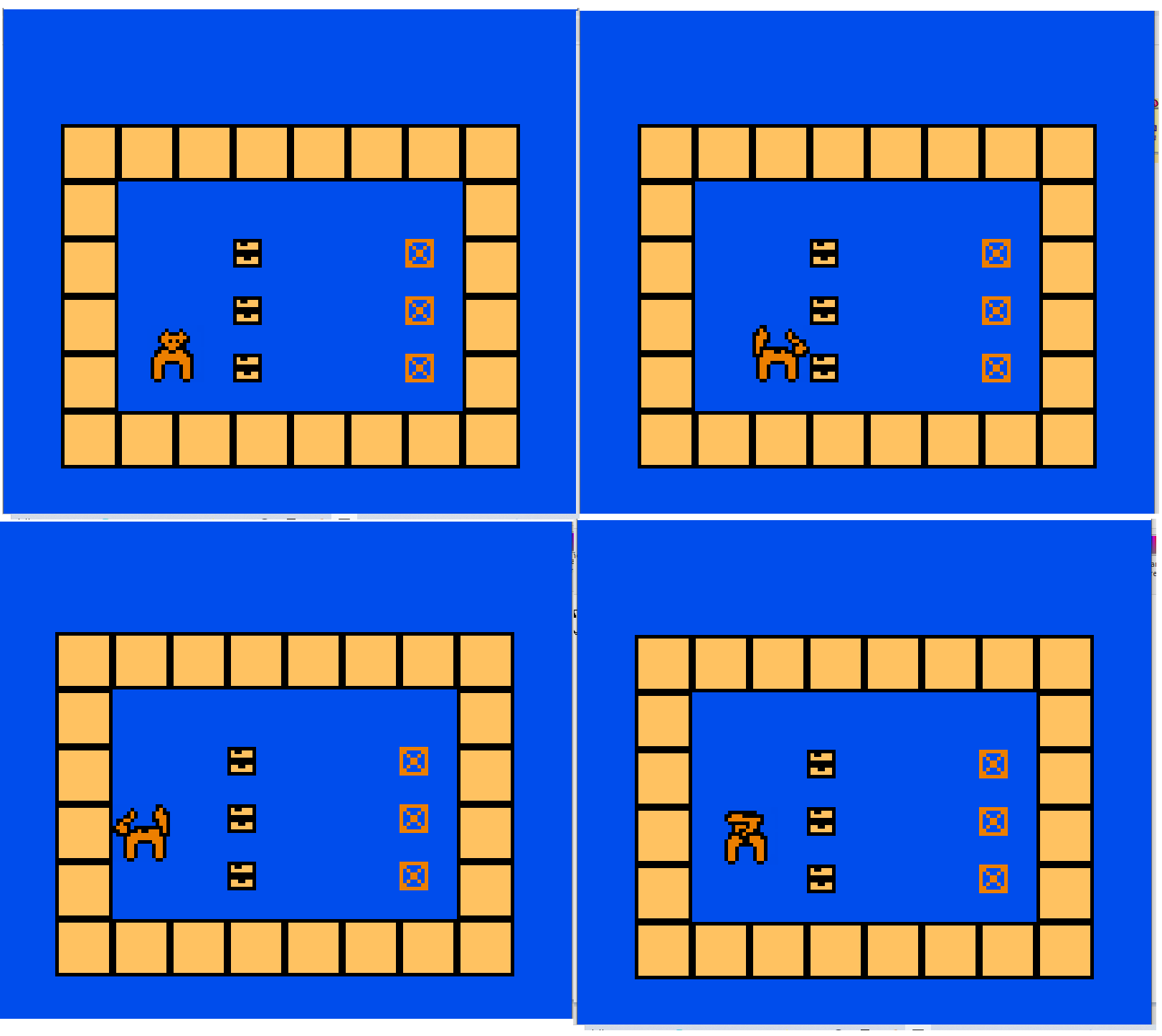
A level in Treasure Shove. Background is a deep blue, walls are yellow and the fox is orange. 4 direction movement is showcased displaying the player character as a fox in 4 legs.
Which is why I didn’t use one here. No, often what has been praised about my code is the underlying logic, not the execution itself. From deconstructing how Nerd Monkey’s Jogo de Saltar works (and no, stll not linking it for SEO purposes) to acidentally recreating the function of LCD games via my code with discreet signals rather than physics. Logic had always been my strength which was why when it came time for me to write Sokoban I decided I could narrow it down to its most basic elements.
This is my code.
//stops you from animating
image_speed = 0//if you press space, well reset the room
if keyboard_check_pressed(vk_space)
{
room_restart();
}//if you press right
if keyboard_check_pressed(vk_right)
{
//and there’s no direct wall to your right
wall_right = instance_place(x + 8, y, obj_wall);
if wall_right == noone
{
//switch to sprite view_right
image_index = 1
//check if there’s a box_right of you
box_right = instance_place(x + 8, y, obj_box);
//if not
if box_right == noone
{
//move
x += 8;
}
else
{
//but if there is a box can you move the box? Is there a wall behind? Check
wall_behind_box = instance_place(x + 16, y, obj_wall);
//if not
if wall_behind_box == noone
{
//and there aren’t two boxes side by side
box_behind_box = instance_place(x + 16, y, obj_box);
if box_behind_box == noone || box_behind_box == box_right{
//move yourself and the box
box_right.x += 8;
x += 8;
}
}
}
}
}Do this for other directions (-8, y+ 8, y-8)
(…)//if there are no more boxes (because they’re all in the target) go to the next level
if (instance_number(obj_box) == 0) {
room_goto_next();
It looks like a lot but it’s actually super simple, and it relies on one of Gamemaker’s built in functions. instance_place. What does instance_place do? It basically checks whether or not you can place an object somewhere in the game world and if it tells you it can’t it returns “there’s already an object here and it’s – this”. This is important, the fact it tells you that space is already occupied and by what is what allows my code to work. It wouldn’t have worked if it was just returning a true or false.
Let us go through the code line by line then, and explain why it’s written in such a way. Because when it came time to approach Sokoban I did not have “concepts of sokoban as a matrix grid” or whatever computer science students would code as a first year assignment, I had a set of rules. So…
//stops you from animating
image_speed = 0
Like I said this literally stops Gamemaker through cycling through the player’s sprites. It locks you in on the current one.
//if you press space, well reset the room
if keyboard_check_pressed(vk_space)
{
room_restart();
}
Good Sokoban games have a way to undo moves. “reset last move” etc. This is conceptually simple, when you have a grid and you can just go “yeah that time you moved the box from [4, 8 ] to [4,9 ] just undo that. It is generally harder when you are avoiding arrays. So I just reset the entire room.
//if you press right
if keyboard_check_pressed(vk_right)
{
//and there’s no direct wall to your right
wall_right = instance_place(x + 8, y, obj_wall);
if wall_right == noone
{
//switch to sprite view_right
image_index = 1//check if there’s a box_right of you
box_right = instance_place(x + 8, y, obj_box);
//if not
if box_right == noone
{
//move
x += 8;
}
else
{
//but if there is a box can you move the box? Is there a wall behind? Check
wall_behind_box = instance_place(x + 16, y, obj_wall);
//if not
if wall_behind_box == noone
{
//and there aren’t two boxes side by side
box_behind_box = instance_place(x + 16, y, obj_box);
if box_behind_box == noone || box_behind_box == box_right{
//move yourself and the box
box_right.x += 8;
x += 8;
}
}
}
}
}Do this for other directions (-8, y+ 8, y-8)
(…)
This, this piece of logic is the heart and soul of my entire Sokoban game. It’s written as a series of nested indented statements, where a condition only happens if all other conditions are true. So how does this work? I didn’t need an array grid, because I was working with + 8 and +16 pixels. You press right, and it tries to instance_place 8 pixels to the right. The first check is for a wall, can it do it? Yes, that means there’s a wall, you can’t move, nothing else happens. Can you check for a wall and there’s no wall? Great, proceed to the next step, cross Go do not collect 200 Dollars. Turn your sprite so it’s facing right.
The second check is for a box, it once again turns an instance_place and checks for a box. Is there a box? No, great, move 8 pixels. Is there a box? Well, we need to see if the box can move. So using our magic instance_place we check, is there a wall behind the box? or is there another box behind the box? If both of those are like “yeah no there’s nothing chief” that’s when you finally move you and the box. You might have noticed this weird section of code too,
//and there aren’t two boxes side by side
box_behind_box = instance_place(x + 16, y, obj_box);
if box_behind_box == noone || box_behind_box == box_right
Why are we checking if there is no box_behind _box or if it isn’t box_right? Because our check is directly 8 pixels to the right, and with our box object being 8 pixels there is a change that what you’re detecting is the last pixel of the box you want to move and not the first pixel of the box blocking your path. It’s one of those edge cases that gets my senior game developer friends to say I’m good at logic. Something I keep bringing up to stroke my ego. It is also something I, as a speedrunner and QA tester professionally have to think about.
There are, of course abstractions and ways to make this code work better without basically copy pasting codes of block here. There are ways to create just one check for direction and have it be 2 lines of code instead of a single if block statement copy pasted. This being a game jam I did not particularly care to optimise my code. Instead I did this.
// — PUSHING left—
if keyboard_check_pressed(vk_left)
{wall_left = instance_place(x -8, y, obj_wall);
if wall_left == noone
{
image_index = 2
box_left = instance_place(x – 8, y, obj_box);
if box_left == noone
{
x -= 8;
}
else
{wall_behind_box_2 = instance_place(x – 16, y, obj_wall);
if wall_behind_box_2 == noone
{
box_behind_box_2 = instance_place(x – 16, y, obj_box);
if box_behind_box_2 == noone || box_behind_box_2 == box_left
{box_left.x -=8;
x -= 8;
}
}
}
}
}// — PUSHING DOWN —
if keyboard_check_pressed(vk_down)
{wall_down = instance_place(x, y + 8, obj_wall);
if wall_down == noone
{
image_index = 3
box_down = instance_place(x, y + 8, obj_box);
if box_down == noone
{
y += 8;
}
else
{
// There IS a box! Check if space BEHIND the box has a wall
wall_below_box = instance_place(x, y + 16, obj_wall);
if wall_below_box == noone
{
box_below_box = instance_place(x, y + 16, obj_box);
if box_below_box == noone || box_below_box == box_down{
box_down.y += 8;
y += 8;
}
}
}
}
}// — PUSHING UP —
if keyboard_check_pressed(vk_up)
{wall_up = instance_place(x, y – 8, obj_wall);
if wall_up == noone
{
image_index = 0
box_up = instance_place(x, y – 8, obj_box);
if box_up == noone
{
y -= 8;
}
else
{
// There IS a box! Check if space BEHIND the box has a wall
wall_above_box = instance_place(x, y – 16, obj_wall);
if wall_above_box == noone
{
box_above_box = instance_place(x, y – 16, obj_box);
if box_above_box == noone || box_above_box == box_up{
box_up.y -= 8;
y -= 8;
}
}
}
}
Is it probably the worst possible way to write this code? Yes. Did it work? Also yes.
As for
if (instance_number(obj_box) == 0) {
room_goto_next();
}
This simple checks if there are still boxes in the level, and if not moves you to the next level. Why does this work? Well I have an object called obj_goal where you need to push the box into. And when you do this happens inside obj_box when it collides with obj_goal
instance_create(x,y,obj_box_done)
instance_destroy(self)
What does this mean? It means it secretely creates an obj_box_done on top of itself before destroying itself. And since obj_box and obj_box_done share the exact same sprite the player doesn’t know. However to the game, an obj_box_done is NOT the same as an obj_box, so when all obj_box are turned into obj_box_done we move on. As obj_box_done inherits its characteristics from obj_wall this means that once placed it cannot be moved out of place. Therefore we have Sokoban. We have boxes we can move, a place to place them in. A condition where if all the boxes are placed you move to the next level, a level reset, and the ability to move and push boxes while walls block your progress. Conceptually it was Sokoban. And without Arrays!
But this all lived as logic in code and there were no levels, or anything to prove it existed…
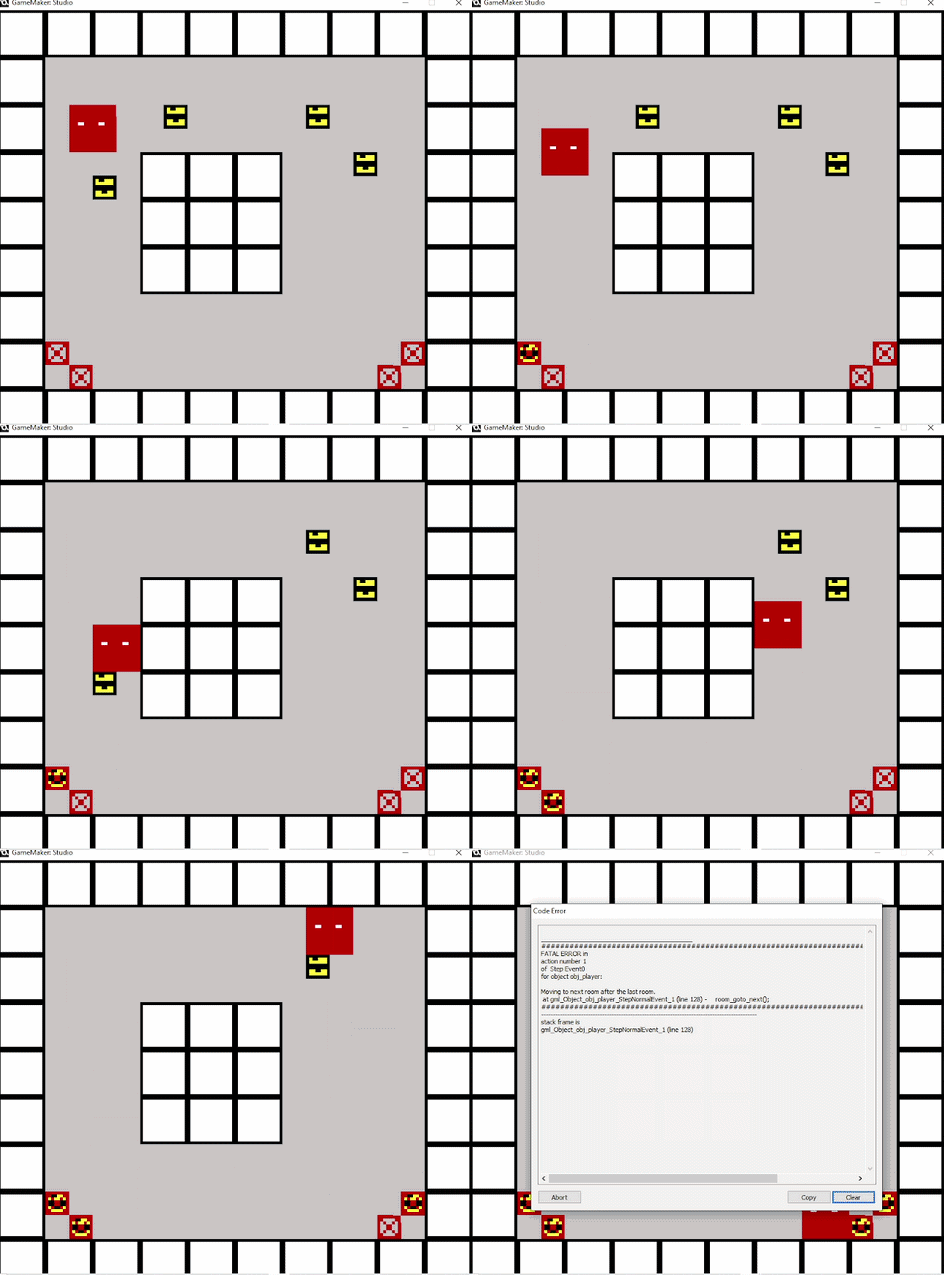
GIF showcasing the player character (still a red square) pushing boxes into targets. The player character pushes 4 boxes into 4 targets leading to the level to be completed and the room to transition (into an error message as no further levels exist)
And then levels!
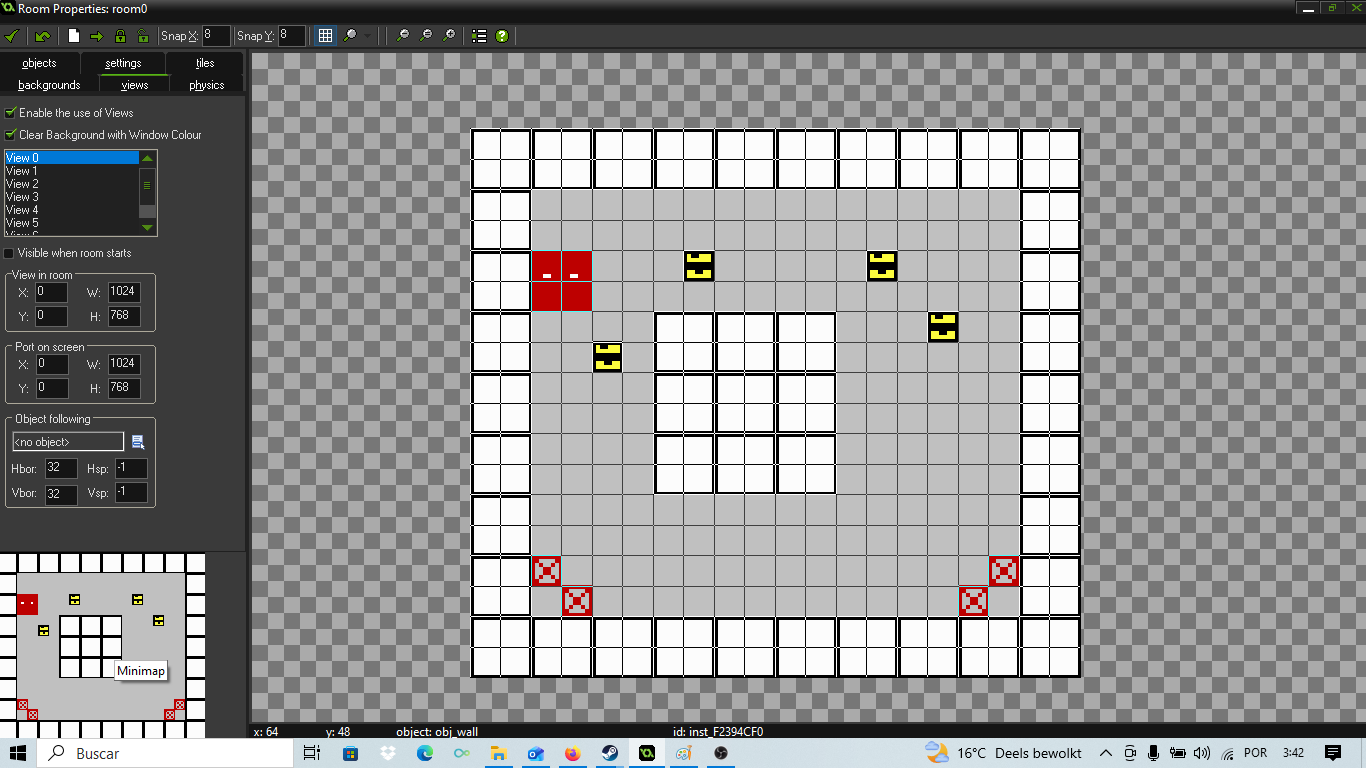
A room view editor of a Treasure Shove level, walls are still white walls, but targets, the player and boxes have been added, creating a fully playable level.
At this point in time I had the entire gameplay ready and set to go. Presumably, if my code was right I could push a box, have it land on the target and have it lock into place. That was, at least what I assumed. Really it was one of those “this should work but…” moments. Using the objects themselves as a grid, rather than having a separate grid with arrays with a graphical representation. In theory? The same, even if it only really worked thanks to instance_place but would it work?
It’s one of those moments where theory has to meet application. One I’m sure engineers always hold their breath for, or first time cooks worry about. Sure, the recipe says that if you put these exact amounts it should come up good, but what if it doesn’t? What I needed was a quick and dirty battleground, just a place where I could test if my mechanics worked.
There were, of course, other constraints. Because this whole game was part of GBJAM 14, the Gameboy game jam I have spent hundreds of words praising and glazing above, I only had a very limited screen resolution of 160 x 144 to make my levels. Though Gamemaker made it easy enough to have a smooth camera that follows the player I had considered having levels that were bigger than one screen. As the game was programmed right now, though it’s a “Gameboy” game you really only need to use the D-pad and never the A or B buttons. My idea was to incorporate using A or B to look at the adjacent screens. Like pressing Triangle to change the camera view and look behind you in old PSX racing games.
I had been 20 minutes into considering how to integrate it before giving up on the idea. Direction + A or B? But then I’d have to rewrite my movement code to be something like If keyboard_check(vk_left) & !keyboard_check(ord(“Z”)) , which would be easy but complicate things. Or maybe I’d have to make the screens always only 3 screens in size, like an L, so then you’d press A and get whatever screen is to your right or left, and when you press B you check the one directly below or above, but that would mean you’d need to “know” where the player is in comparison with –
Well it wasn’t that I could not do it. It would be shockingly simple to but I was powered by both the victory of figuring out my logic, and having it presumably work, and the trap of forward momentum. Things were going out so well that touching code that, though probably not the best way to do it (probably? It’s the worst way to do it, and I know it), I felt like a genius writing it felt unbearable to me. Working commercially on videogames one of the first hard lessons I had learned about was SCOPE CUTTING. Because getting a product to ship is more important than making a game where you promise the moon and run out of budget, time, and polish and either release a worse product or nothing at all. And though I found myself maybe using it as a coping mechanism I reminded myself of the simplest rule of game jams. Keep it simple. If I already had the mechanics for a single screen Sokoban, then why not stick to that? It would be literally a tick, a check in the room editor for a smooth camera but, no. my design was set. One screen Sokoban.
Sticking to a single screen the constraints were as followed. Given my wall tiles/blocks were 16 x 16 and the screen resolution was 160 x 144, and given every level “boxed in” the player, at best, using every single available space, I would be able to have a 10 x 9 space. 10 blocks left to right and 9 blocks up to down. Technically the 9th block up and down would be the 10th block left to right. Or a 34 square border box Sounds confusing? So…
This technically gave me a playable space of 56 16 by 16 squares inside a perfect square box. Movement being 8 by 8 the player could move 112 different ways, assuming no boxes, or other walls. Which is all a very mathematical way of saying, puzzles could be brute forced. Had I more technical skill or time I could have designed a simple program to test every move and design puzzles for me. But I was on a roll and this was a gamejam, so I started designing levels.
The first level I designed was simple. 160 x 144 boxed in, 4 walls in the center, player starts at the top left, four goals at the bottom, boxes near the corners. It was a simple piece of design. Plenty of space for the player to learn how to move, enough space that the player would LIKELY not push the box against a wall and have to reset and visible, clear enough goals.
It was here that I discovered a bug with how my code collides with my level design…
Remember how my obj_box_done has inherited the characteristics of a wall? That makes it so it doesn’t get pushed by mistake, and isn’t an obj_box, but it also means that to the game it’s basically a wall. Nothing else, nothing more.
Let’s look at my code again.
(…)
// There IS a box! Check if space BEHIND the box has a wall
wall_below_box = instance_place(x, y + 16, obj_wall);
if wall_below_box == noone
{
box_below_box = instance_place(x, y + 16, obj_box);
if box_below_box == noone || box_below_box == box_down{
box_down.y += 8;
y += 8;
}
}
}
}
}
Notice how you only move after you chcek if there’s space for the box and yourself to move? This means that if there is technically space 8 pixels down, left, right or up for the box to be placed but a wall or a box 16 blocks down, left, right or up though it is technically possible you do not actually move, nor the box. Because the check comes from the player, and not the box itself, which means that though technically a “legal” move, this will not work. After all we are not checking for the obj_box_done as an exception.
What does this mean? Suppose you have goals in a square, four squares of “target” or “goal”. You press the first box into a corner, no issue right? You bring the second box and attempt to place it directly above or to the side of that box….except…it doesn’t go in. Uh oh. the game detects an obstruction and since there IS something 16 pixels from the player – oops can’t do that.
Now, I could go tinker with my code and try and fix it. It would have been easy enough, add exceptions for obj_box_done, or change the entire logic. But that would be a bother wouldn’t it? It would be an expense of energy that I did not particularly care for. So instead, understanding my code well enough to know why the bug happened I simply decided to be careful with how obj_target is placed. If rather than in squares, or directly up or down from each other all targets were on a diagonal, ofset by 1….well that worked didn’t it?
The other 4 levels took about 5 minutes each of playing with my room editor. I had played enough sokoban games in my life that I knew sort of what to do for level design. Level 2 has a long 4 blocks wide “vertical” shaft down to the goals after a “staircase” where the goal is simply to position yourself without pushing the box too close to the wall. The fact that I had chosen to make my player character 16 by 16 rather than 8 by 8 like every other block made this task harder.
Level 3 is just an inverted “L” shape. The player spawns right at the bottom, the targets are offset at the end of the L and the boxes appear 2 tiles apart vertically from each other, in a I configuration. I wanted the player to be able to check two things. One, are they clever enough not to immediately push it up without thinking, and smushing the boxes together and two, did they understand the rules of my Sokoban? Because if they start filling the goals the wrong way they will be unable to complete the level (remember the boxes in place being turned into walls).
Level 4 increases the amount of boxes and narrows the playfield so that there are moments where 2 x 3 gaps are available and you must prioritise what box to pick up first. Though I had never really made any sort of Sokoban level myself it was the sort of design that I had seen plenty in my childhood and one I now understood the purpose of.
Level 5, the final level has 6 boxes, and much less space to maneuver. Though I could wax poetics about how I came up with it or how it’s an escalation of difficulty the truth is I mostly came up with it by trial and error. I’d try it, see if if fit the amount of challenge I wanted, or if it was lowkey impossible, and redraw. After about 3 or 4 attempts at a level I had it.
I suppose what stood out to me the most was that by not starting with the level design and writing my code to complement it but rather create the movement code first and then adapting my level design to it I had a game that I KNEW to be possible from the get go. And though I had yet to have a winning screen or any other such niceties, I technically had a game that you could beat. 5 levels, of increase challenge. And suer the player character was a red 16 by 16 square with two pixels indicating eyes, and it was moving other squares into empty squares but…for now. I had a game. Creating sprites replacing my red box with a 16 by 16 cute looking fox and my boxes for piles of gold, because the theme was OLD GOLD took about 5 minutes but added so much with the visual polish!
Birthday Progress
September 18th brought about my birthday. It was also the day I was introduced to the makeup section at HEMA, a dutch generalist store where a lot of my friends shopped for gifts so as to allow me to express my gender identity and express how I see myself. While I had earlier gone to HEMA for their famous sausage, something my Dutch friends INSISTED was a tradition, and a general pick me up food I couldn’t help but find it incredibly heartwarming how several of my friends all had the same idea. Let’s give her makeup! Perhaps it was that they knew of my love for My Chemical Romance, perhaps it was the fact whenever I had used makeup I had done it “Emo style”, a mixture of pink/flesh colored eye shadow with a bit of purple or black thrown in and smooched, black eyeliner and purple lipstick. Even as I got through what felt like a lecture on what a base coat is, a color coat and then a top coat and how varnish compares to gel, while I pointedly took to it with the same intensity I reserve for my sociolinguistics reads I couldn’t help but feel proud of myself. I now had a game that I could play, start to finish, 5 or so levels of pure straight Sokoban coded in a way that I knew not to be the most efficient way or correct. Though I had considered (as previously mentioned) using those damn arrays that haunt my nightmares I had brute forced it. It would be a crime I could get away with, if not for the fact I’m writing this blog post.
An attempt at displaying the game centered after a failed bezel code writing attempt. The gameplay is not only incorrectly scaled stretching out half the screen and the resolution the bezels are incosisntent and a deep dark red color rather than the image they should be loading.
It had no main menu, it had no sound, and technically it had no borders yet, though the friend I had managed to trick, erm I mean assist me in making the game had been working on both music and art but it was playable start to finish. Without getting bogged down into what makes a game or doesn’t, because that’s a discussion I like even less than what is meaning in translation studies, I could have feasibly be done with the game. That is to say it wasn’t much of a game but it was a GAME ™. It would not have scored high, and it would probably be played by even less people because it’s a download and not something you can play in the brower, a limitation of Gamemaker but it was done. Getting something playable fast, and something that technically could be considered a minimum viable product is something that I have always been proud of achieving easily. In fact while I do not have the careers my friends in gamedev do, seniors at Ubisoft or former leads at Guerilla what I can say is that they, alongside my friends who choose the relatively safer Software developer but not game developer careers at companies like NOKIA have always praised my code in the best possible way. It works, if it works it’s not stupid, you clearly think like a programmer. Friends trying to push me up? Perhaps. But having grown up with actionscript and Blitz Basic, I still panicked whenever I saw someone declare a type (INT? INT?????) or worse, importing libraries (USING??? USING WHAT?). Sure my style of programming was so 2008, but let me make a reference no Gen Z will get, I’m so 2008 and you’re so two thousand late.
Three plates of white ham and cheese sandwiches cut into triangles.
Indeed to be told that I am good at logic did more than help combat my imposter syndrome, always present in everything I do. Hell It did more than make me preen, however temporarily before my trauma made me feel bad over my arrogance and self-reassurance. No, just like I knew my code to be bad for maintenance as a code base, direct and closer to manipulating pieces on a game board than actual structured code following all the best practices in computer science, a degree I do not have, I knew I still wanted to do something more. The gamejam was set for 10 days. It was now my birthday and though I was spending it flirting with friends, helping friends with trouble given my activism experience and having chocolate cake the topic was still on my mind. I had not worked on the game at all on the 17th. So while I had the ham and cheese sandwiches on white loaf bread, cut in triangles, something of a birthday tradition that connects me to home, the sandwiches one of my headmates prepared while grumbling about it, secretely enjoying the fact he took care of me I planned. What exactly could I add? What exactly was missing? I had earlier created a title screen of sorts. A furry fox character drawn in half figure in 160 x 144, done in all of the four color limitations of the Gameboy. It did more than plant doubt to the idea I was more than furry adjacent and straight up a furry. After all drawing anthro foxes that easily? But it was a beginning.
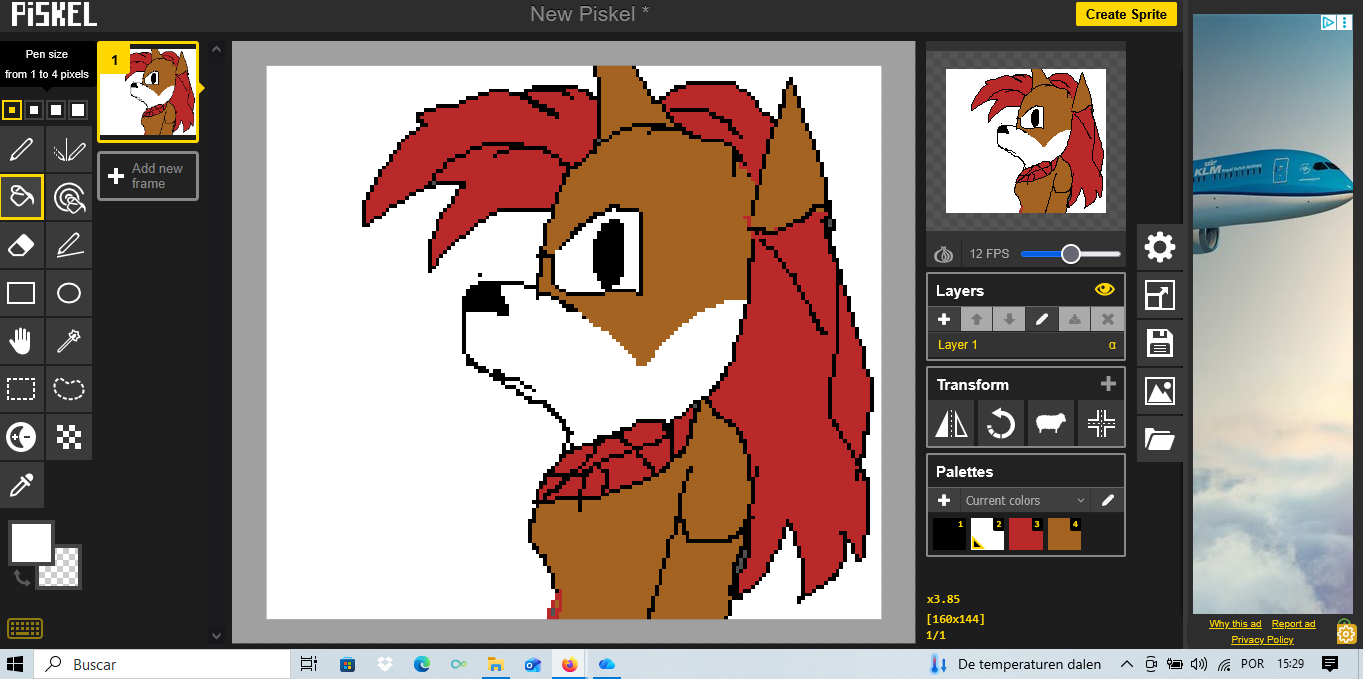
I started out by turning that one single frame into four with a very limited animation of the character winking. It was a basic loop, a cycle. Eye fully open, eye halfway open, eye fully closed, eye halfway open. The fact that the animation loops seamessly means that the character will always be looping through her blink. Making it an object, rather than a background, allowed me to write code to control that animation. That was simple enough.
CREATE EVENT
animate = 0
STEP EVENT
image_index = animate
animate += 0.2if animate > 4
{
animate = 0
}if keyboard_check_pressed(vk_enter)
{
room_goto_next()
}
It simply set the speed of the animation and set it to loop. Because I had inserted “Press start” as part of the one “sprite” that was the entire title screen 160 x 144 which I would then just glue on its own room I made it so pressing enter simply moved you forward. The room system of gamemaker allowed me to quickly separate this.
I could have moved that directly onto gameplay, after all it was a “title screen”, but I had other plans. with room9 being the first room I proceeded to go straight into work at room10. I created two buttons. 96 by 32, spr_options and spr_options2. In them “how to play” and “play”.
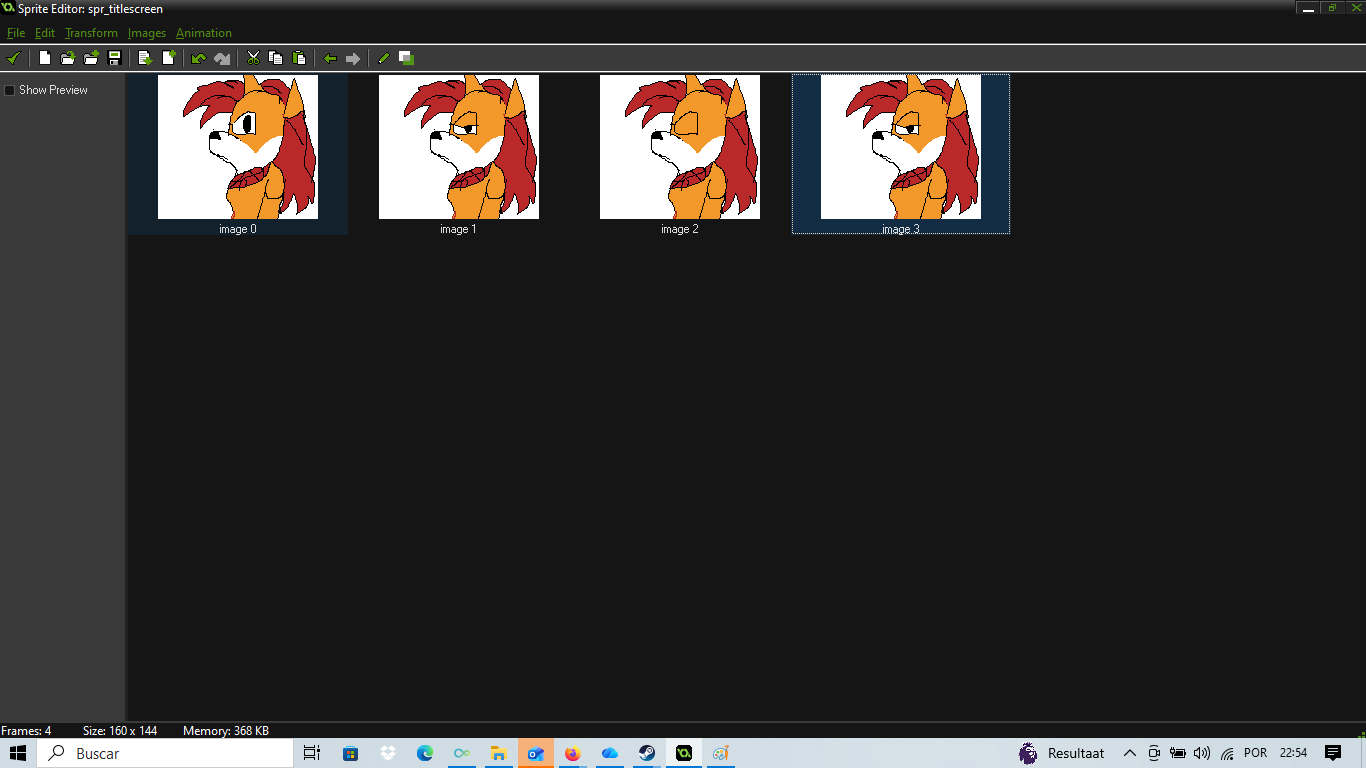
Screenshot of Gamemaker’s sprite editor showing the winking animation of the previously mentioned fox.
I could have made them glow when selected and just used a bit of code to check out if they were selected. It would have been as simple as a simple state machine, or, at worse somehing like
CREATE_EVENT
animate = 0
STEP_EVENT
image_index = animate
if obj_cursor.y == obj_options.y
{animate = 1
}
else
animate = 0
or something similar but I had a different idea. I created an 8 by 8 black square, placed them alongside each of the options (now in a room, room10) and wrote this quick bit of code.
CREATE_EVENT
position = 0
STEP_EVENT
if keyboard_check_pressed(vk_down) {
position += 1
}
if keyboard_check_pressed(vk_up) {
position -= 1
}if position == 0
{y = 32
}if position < 0
{
position = 1
}if position == 1
{y = 80
}
if position > 1
{position = 0
}if keyboard_check_pressed(ord(“Z”)) and position = 0
{ room_goto(room11)
}
if keyboard_check_pressed(ord(“Z”)) and position = 1
{ room_goto(room12)
}
Basically it does two things, it allows you to move the obj_cursor up and down (and down and up as it wraps around) by pressing up and down and takes note of what position it is in. If one then presses Z, which represents the A button in this Gameboy Jam, it checks the position and depending on whether it’s position 0 (which hovers over play) or position 1 (which hovers over how to play) it pushes the player to a specific room.
Room12 (or how to play) is simply an object with instructions on how to play the game. Alongside this line of code
STEP_EVENT (obj_howtoplay)
if keyboard_check_pressed(ord(“X”))
{
room_goto(room10)
}
Which places the player back in the main menu room, while room11 is the first level of the Sokoban game. A genre that, once again, I was sure no one had ever come up with and that obviously was such an original creation and concept of mine…
I HATE writing boilerplate (bezels are hard ya’ll!)
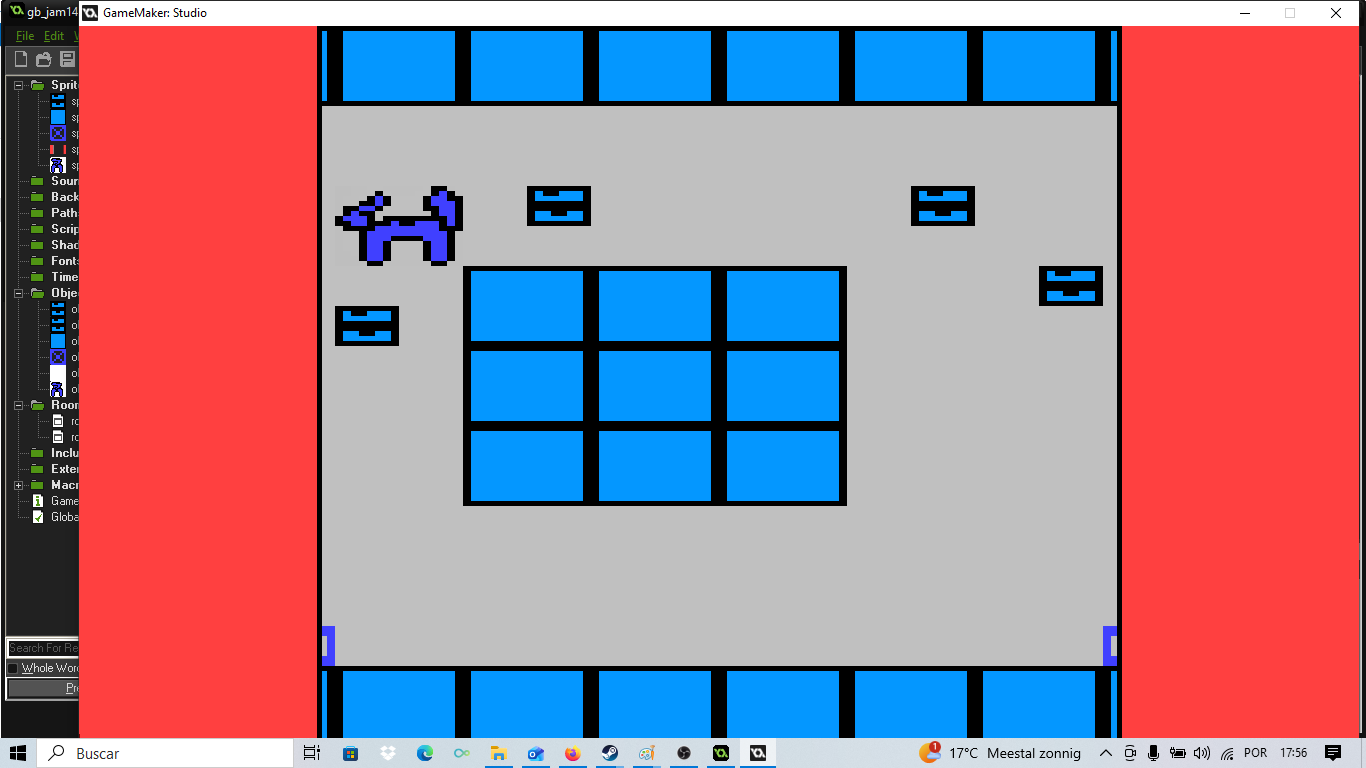
An attempt at displaying the game centered after a failed bezel code writing attempt. The gameplay is not only incorrectly scaled stretching out half the screen and the resolution the bezels are incosisntent and a deep dark red color rather than the image they should be loading.
And thus we get to boilerplate code.
What is boilerplate code? While I could simply copy paste the wikipedia definition, I think I can place it better as what it isn’t, than what it is. Boilerplate is code that you NEED to make your game work, code you copy between projects, code that you insert in your project and that has no creative value. It makes things tick, it makes things work but it’s code that while it needs to be there, doesn’t really excite you, result in gameplay or otherwise results in anything besides your game just…working. It’s somethign you spend a few hours writing once (and cursing yourself for it) and then never think about again.
It’s everyone’s least favorite part of writing code. It’s the glamorous behind the scenes code that scaffolds the entire project. And unlike theater, where there can be genuine pride in work behind the scenes, and the illusions and efficiency of it I have not once met a programmer who feels pride in their execution of boilerplate. It’s the “ugh must be done” of game making. The “cleaning the dishes” or “peeling potatoes” of a good meal.
I…don’t much like writing boilerplate code.
Remember earlier when I mentioned that I was using this game jam to try and figure out how compatible me and a friend were? When I had spent hours flirting with them about getting them to watch me speedrun Sonic 3D Flickies Island, acted horrified when they told me that Fur Fighters was a game they enjoyed (only to get it when they revealed it was the PS2 version) or challenged them for a Power Stone 2 tournament before over explaining my own boundaries so they didn’t feel pressured into anything, I had found myself blushing and really enjoying the interactions. We were obviously compatible in a sense, as if both of us owning Sega Saturn games and agreeing the Dreamcast to be the best system ever, but the game set out to answer a question. Were we creatively on the same page?
I bring this up because the fact I lived for their grasps of appreciation at seeing things move on screen, or them praising my skills as a programmer was the only reason I did not drop the idea of a bezel. But what is a bezel?
When you launch a game on a modern 1080 display at 160 x 144 you find yourself with a problem. It looks tiny. Like a postcard, a half an inch rectangular display on the screen. I say rectangular of course because the resolution is 10 x 9, but whether it’s rectangular or square like it doesn’t really matter. I could dynamically scale the image 5 or 6 times so that it took up more screen real estate but that really did NOT solve my problem.
So when I had asked this furry artist friend of mine, with ocasional music making as a hobby for help I had always planned on having a bezel. The gameplay would be in the center, scaled up, yes but there would be a border around with art and the controls for the game. While the rules for the game jam demanded 4 colors only and 160 x 144 resolution (scaled up if you’d like) for the gameplay itself, they allowed what they called Super Gameboy like borders. Here, I figured, was where my friend would come in handy. Weren’t they good at drawing foxes? And hadn’t we brainstormed what to make, before deciding on Sokoban where you play as an animal?
Leaving aside my plausable deniability over whether or not I am a furry or just furry adjacent, because I already have explanations ready on WHY I decided to create an anthro fox as a character a game border would allow me to have the controls on screen at all times. Although it was tradition to input game controls on the Itch page, having them in game would be, I felt a little bit of polish that reduced friction to anyone trying out my slash our game. I was already fighting a downhill battle, what with making the game a windows executable rather than playable on browser, so anything I could use to increase my ratings was good.
It would be the height of rudeness to ask them for art, demand it to specific sizes and resolutions and THEN because I could not deal with the programming simply not use it. So though I hated boilerplate I decided I had to do this.
…Or I could simply copy someone else’s homework. I had been complaining about the terrible terrible attempts at my code to create borders. Gamemaker 1.4 being infamous for how hard it is to display borders over gameplay when a friend of mine (and commercial game developer) offered to send me their code to fix it. Faced with my own terrible code, which I’ve transcribed below I worried not about the boundary between two game dev friends, or how overwhelming generous and kind to offer commercial game code was, but felt only relief.
Create on an obj_management
window_set_size(1280, 720);
surface_resize(application_surface, 1280, 720);
display_set_gui_size(1280, 720);
view_enabled = true;
view_visible[0] = true; view_xview[0] = 0;
view_yview[0] = 0;
view_wview[0] = 160;
view_hview[0] = 144;
view_xport[0] = 240;
view_yport[0] = 0;
view_wport[0] = 800;
view_hport[0] = 720;
The difference beween what is a port, an application surface (which is where the game is actually playable), a view, a window and a display was something that I had in my mind from reading the help documents, and something that I had sort of figured out. I knew I needed to draw in the GUI interface because that overlays the game, and yet errors kept coming. I knew I needed something better than my code above.
And the code that my friend gave me was genuinely production level code. It adapted itself to ANY screen resolution with math, it accounted for fullscreen, windowed mode, and even non standard screen resolutions. The fact they literally sent it to me stripping out anything I DIDN’T need for the code was an act of genuine good will and kindness I cannot overstate how much I appreciate.
But it was also code I would need to spend some time figuring out and adapting to my needs. And I had at that point spent two entire afternoons looking at this and cursing Gamemaker’s implementation of UI elements and GUI stuff. When I closed my eyes I saw numbers. I was done with the idea of changing a value only for the scaling to go wrong and it look vertical, fix that and now only the first half of the screen is shown, and now that’s fixed but part of the screen is cut etc.
I hate writing boilerplate. But somehow, debugging boilerplate was worse. I ended up deciding, it doesn’t need to be fancy, it doesn’t need to scale up. This is 2026, this game will be buried by the algorythm and played by what 15 to 20 people ever? What are the chances they will be using a 4:3 monitor?
So I decided to just assume 1280 x 720 as the default and work from there…All the while because I needed a distraction I had sent the game (still sans border or music) to a couple of friends to playtest it. I am cheating my timeline here a bit, in the draft I have penned the next section is “music and finishing touches” which is where I SHOULD discuss this but the feedback was clear “the first level is easy, just boring for how long it takes to do”. Not challenging, tedious. As a first level, it felt like it started too big, like it should not be at the start.
So I created another level before it, far shorter and simpler. Just a simple corridor, 6 talls tall by 10 wide with 3 boxes and, directly to the right the 3 targets. What I was asking of the player was simple. Just press right. They could do that right?
Which unfortunately only took like two minutes. As an attempt to procrastinate writing boilerplate it had gone nowhere. Still. I knew what I needed, now I had an actual resolution in mind all I had to do was to write the simplest code I could.
Create Event
window_set_size(1280, 720);
window_center();
display_set_gui_size(1280, 720);
application_surface_draw_enable(false);
surface_resize(application_surface, 160, 144);mainSurface = surface_create(160, 144);
gameBorder = spr_border;
audio_play_sound(music,10,true);
Draw GUI Event
if (!surface_exists(mainSurface)) {
mainSurface = surface_create(160, 144);
}surface_set_target(mainSurface);
draw_surface(application_surface, 0, 0);
surface_reset_target();var gui_w = 1280;
var gui_h = 720;
if (gameBorder != noone) {
draw_sprite_stretched(gameBorder, 0, 0, 0, gui_w, gui_h);
}var gameScale = 4
var screenW = 160 * gameScale; // 640 px wide
var screenH = 144 * gameScale; // 576 px highvar screenX = (gui_w – screenW) * 0.5; // 320 px margin left/right
var screenY = (gui_h – screenH) * 0.5; // 72 px margin top/bottomtexture_set_interpolation(false);
draw_surface_stretched(mainSurface, screenX, screenY, screenW, screenH);
So what does this code do? As much as it’s giving me flashbacks to look back at this code, let’s go line by line and see what it does. The first thing it does is set the screen resolution, and game window to 1280 by 720 and center it. Though this technically means this isn’t a game you can change the resolution of, or play in early 2000s computers I figured that most people would be playing it on a 16×9 screen anywa.
window_set_size(1280, 720)
window_center()
//set window, and center it
In gamemaker the GUI is a layer over the actual display of the game, so it’s rendered differently, hence we have to also set its size.
display_set_gui_size(1280, 720)
Gamemaker will try to take over drawing the application_surface. The application surface being what’s inside of rooms, you know the actual gameplay. We have to tell it, no thank you 🙂
application_surface_draw_enable(false);
And now we manually control it we resize the application surface. Because our game is already 160 x 144, resizing it to fit our resolution makes sense.
surface_resize(application_surface, 160, 144);
We define main surface as the surface we create (with the appropriate size), and define a few variables, for example gameBorder is our spr_border. We also initialise the music (which I have yet to talk about) here. Because this is an object that will be set once and never be brought up again anyway. Better abstraction would have the music controller be its own object but I figured I might as well use it.
mainSurface = surface_create(160, 144);
gameBorder = spr_border;
audio_play_sound(music,10,true);
So now we’ve made sure our game is 1280 by 720, our application surface is 160 x 144 and our GUI matches our window size, we can go to the DRAW GUI event. We use Draw GUI, not Draw because we need to overlay items over the game. We start by checking if the gameplay surface exists at all, and if not, we create it.
if (!surface_exists(mainSurface)) {
mainSurface = surface_create(160, 144);
}surface_set_target(mainSurface);
draw_surface(application_surface, 0, 0);
surface_reset_target();
We now introduce several variables, width and height of the gui (gui_w, gui_h) and check to see if we have our beze. If we don’t we draw it, using math to cover the 1280 by 720.
the game var gui_w = 1280;
var gui_h = 720;
if (gameBorder != noone) {
draw_sprite_stretched(gameBorder, 0, 0, 0, gui_w, gui_h);
}
But though we now have a bezel, our game is still extremely small in the center of the screen as an application surface. What to do?
var gameScale = 4
var screenW = 160 * gameScale; // 640 px wide
var screenH = 144 * gameScale; // 576 px high
Let’s scale it so it fits more of the screen of course! At 160 by 144 scaling it by for makes it a 640 x 576 gameplay screen. Theoretically a 5x scale would fit within a 1280 x 720 window but my Dreamcast enjoying friend with whom I flirted had created art so good I wanted to preserve as much of it as possible.
using some math we can calculate the screen borders. the entirety of the gui_w (1280) – the screenW (gameplay square), divided by 2. Multiplicating by 0.5 being, of course the same as dividing by two. This gives us the margins. left and right. Do the same with screen height and gui height and you get the top to bottom margins.
var screenX = (gui_w – screenW) * 0.5; // 320 px margin left/right
var screenY = (gui_h – screenH) * 0.5; // 72 px margin top/bottom
In what has to be the most crucial step in a pixel art game we set texture interpolation to false. What is texture interpolation? it tries to smooth out stray pixels and create a continuous image, but in a game with such small resolutions it makes pixels blur together, not sharpand crisp.
texture_set_interpolation(false);
And finally we draw the entire screen.
draw_surface_stretched(mainSurface, screenX, screenY, screenW, screenH);
This is code I half cooked up by watching way too many tutorials, reading all the help files I could and it’s code that while it WORKS, I still don’t fully understand. Treat it as black magic, do not touch it or it will break. Like a rock precariously balanced, do not even breathe near it.
My degree is in translation of course, just look at the name of this blog, Talking-Translation and at the dozen plus articles on translation theory and examples of translation I’ve written. That is to say that though I did have math in high school it was applied mathematics. Statistic mostly, election models, the like. I was a failing student at most actual math and by age 14 I had dropped it out of my learning environment in favor of languages and History. Although programming is already by itself applied math, and learning Vectors has been useful to me, I look at this whole boilerplate with horror. It’s code that I’ve written. Code I TECHNICALLY know how it works, but code I never want to do anything but copy paste. Or to put it in a very Portuguese way “Afasta-te DIACHO”.
Still, It was something I was glad to do. Well…something I thought worth doing to honor the effort my friend had put into it, and to make sure this collaboration worked well. But that wasn’t the only thing they were doing. They were also doing…the music.
Adding the music and finishing touches
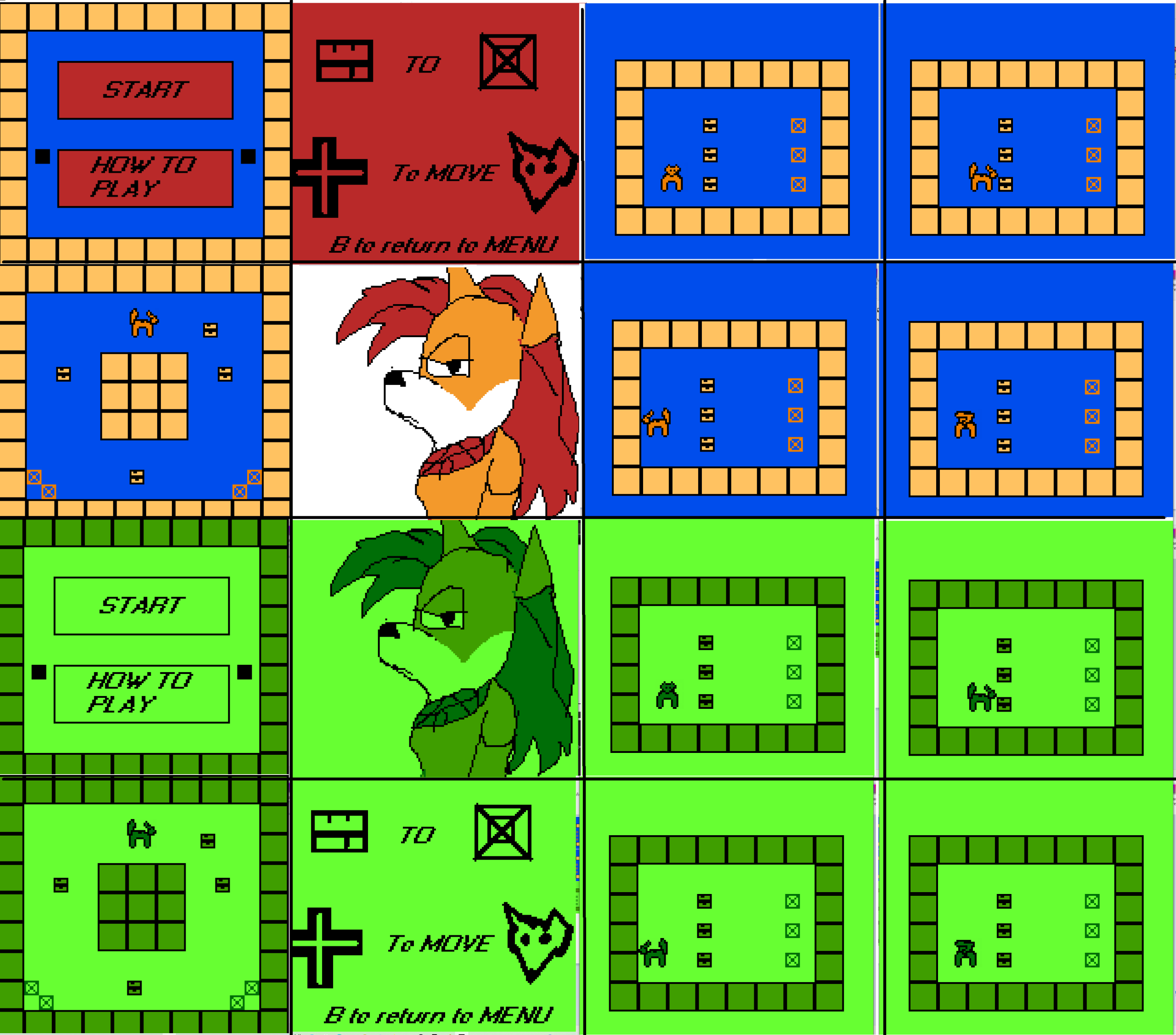
Comparison image showcasing the title screen, main menu and some levels. ON top the original use of colors in VGA MODE, at the bottom the same screenshots, but with the new 4 tones of green Gameboy like colors.
We still had about three days before the deadline and I had found myself at a really good place. In 2025 I had worked with my fellow team members at Atelier Cassette on a way too ambitious Metal Gear Parody, Stealthy Dicey and we had literally submitted the game the very last minute possible only for players to manage to go out of bounds within an hour and there to be a game breaking bug discovered within 20 minutes. This year, knowing that my fellow team mates were busy and could not help during this game I found myself deciding on a scope far more realistic for one programmer with some help in music and art by a friend, who they were now kissing.
Which was why the last day I decided to dedicate to polish. GB Jam had provided us with a logo/BIO screen we could use at the beginning of our game to indicate the game was part of the jam. Because I needed a place to drop my boilerplate (ugh) code anyway, and by its very definition that room should never be called again I used that bio to initiate my code.
I also decided to create an ending to the game. Creating a sprite that was 160 by 144 I drew a smiling fox, with the text “You WIN!”, while swearing up and down to not be a furry, converted it into an object obj_ending and placed it in a room of its own. Then I added this code
if keyboard_check_pressed(vk_enter)
{ room_goto(room10)
}
if keyboard_check_pressed(vk_space)
{ room_goto(room10)
}
if keyboard_check_pressed(ord(“Z”))
{ room_goto(room10)
}
if keyboard_check_pressed(ord(“X”))
{ room_goto(room10)
}
Which meant that any button (within the Gameboy framework) the player pressed would send them back to the title screen. Theoretically I could have just turned my sprite into a background of the room, rather than an object and have an invsible object with the same code, but the result would pretty much be identical. Now with an ending I created a new object “obj_credits”, which was just a rectangle with the credits. 3 sprites, each with a name.
Programming/Art:
Michelle Caldeira
Music/Border:
Fozzhoria
Special Thanks:
Nick V
(Daikon Games)
Looping thanks to some very simple code.
CREATE
animate = 0STEP
image_index = animate
animate += 0.05if animate > 3
{animate = 0
}if x+ 48 > 144
{
x = 0
}
Why if x + 48 > 144? Originally I wanted the credits to come flying from the left of the screen. However I found that that actually made the credits harder to read. It was x + 48 because the rectangle in which the credits sits is 96 by 32 but I start counting from the center. Really best practice would have been to either delete or comment out that code (putting // before it so it couldn’t be read) but since I gave up on the idea and never actually add to x to make the rectangle scroll right it doesn’t matter anyway…
The music arrived, and it was glorious. My friend, a very talented fox I dearly cared about had told me she would “try and do something” and had made it a point to try and lower my expectations. Pointing out how she didn’t create music very often, and how really she was not a musician at all. I ignored her concerns. It was far too similar to my own imposter syndrome and far too much like the modesty that had been beaten into me as a child. Though I prepared for the eventuality that they wouldn’t be able to create music and recorded something myself she did not disappoint. Implementation was easy. I already had an object that was only called up once to create the graphics. So – why not use it for music as well? I just gave it priority and made sure it looped.
With two days left I decided on perhaps the most radical design change yet. GB Jam mandates that you only have 4 colors on screen at once. However it does not tell you which ones to use. I had been using the fact to mostly use contrasting colors. Yellow and Blue and Red. This technically fit the requirements but I thought it to look far more like an early DOS game with VGA than a Gameboy game. It wasn’t the resolution or the sprites. Those were fine. It was the color choice.
A few hours prior to submiting the game I swapped the contrasting colors with the Spinach green of the original Gameboy. Though I picked the colors by eye and did not use established RGB values, leading to a look far more FALLOUT terminal than Gameboy it looked recognisably Gameboy. I had considered, because I still had a day or two left , creating a shader that would toggle between the two modes, full color and 4 green colors. I even thought to make it a separate mode in the title screen, “color mode”. The code would not be that hard to create. Though very few people knew Gamemaker 1.4 had shaders it was probably the simplest possible design. Just get the rgb value of a single pixel and replace it with another rgb value. The simplest shader.
A game jam, two days from finish seemed like a really poor time to try and start programming a shader though, and while at first I thought “what if I just double every object, and have an obj_player2, and a room_lv1_2 and the color game just jumps to the rooms in color with obj_player2 with colors etc in the recreated room_lv1_2 with the duplicated objects” I decided against it. The game was already made, and though I could feasibly had done it. – It would take 1 or 2 hours max and I still had several days. – I would rather not break what worked.
There were only some very small things for me to do. My artist friend created a game box. I created an icon for the game and loaded the ico file into Gamemaker and then it was done.
I submitted Treasure Shove one day and twenty one hours before the deadline.
CONCLUSION
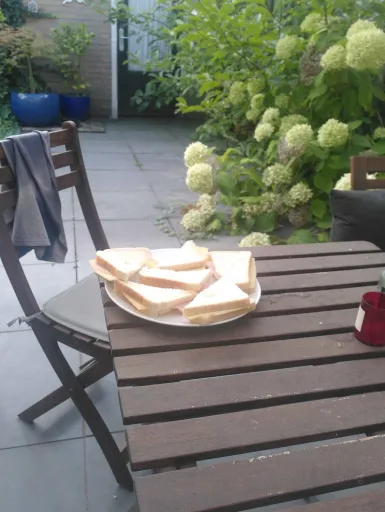
A plate of cheese and ham white bread sandwiches cut in triangles sits outside, the sun shining on it,. Some kind of garden and plants can be seen, indicating whoever placed them placed them in an outside garden or some kind of park.
As I sit here, burnout evident and the need for my meds to be refilled clear I cannot help but look at the game I made with pride. Coming from Portugal to the Netherlands in mid June I found myself completely off-kilter with constant complaints about the way things worked or were run here. Things that would figure easy for me in Portugal were constantly met with a price barrier or a structural need for bureocracy. From mandatory healthcare insurance, to library card fees, to rush hour fees that were nothing more than a working class tax I found myself disillusioned with the Netherlands as a country.
I had all the sociology critiques, and the literature to back them, and I had all the class awareness or political theory to condemn it. To my friends it was a system that “has always worked that way”, but to me it was proof of an ideological hard-on for free-markets overriding the social contract. Personal responsability as a motto making it so even dying wasn’t free. Seriously you should have seen my face when I heard about funeral insurance, as if it wasn’t Social security’s job to pay for a basic funeral.
The truth is that between weeks without medication because of how the system works and endlessly refusing my Portuguese prescriptions out of a sense of CYA (cover your ass) and seeing turnstiles in library bathrooms I felt myself grumbling more and more. I was escaping abuse in Portugal, but I was not a fan of the Netherlands, or at least how things were run here. That is to say, above all I felt helpless. Like my fate was not entirely in my hands.
GB Jam 14 helped. I’ve written a thousand words on this very blog post about how GB Jam has become THE jam I do every year. The one where I declare my new normal, the one where I prove to myself I still have it.
Coming back to this blog, a pattern is visible, 9 blog posts in 2020, in 6 months, 9 in 2021, 3 in 2022, then 1 right at the end of 2023, before letting the blog domain lapse and expire in 2024. As my disability progresses (and it is getting worse) this blog threatened to become just another victim to my lack of spoons. Except with my executive disfunction something else happened. If you look at the amount of blog posts in 2026? We’re on 24, right now and that doesn’t include this one.
My need to document everything, as my exhaustion and chronic pain grew, to have “receipts” that prove that I HAVE done stuff meant that, same as I have now filled over two journals with my thoughts, I have written about most of the games made this year. Because it has been a creative resurgence hasn’t it? I have gone back to writing fanfic. I have made 5 or 6 games, and I have been writing blog posts. Though things have not always been easy , and indeed though I have struggled I have found myself surviving, and pushing through.
And that is what I’m choosing to take away from this blog post and my entry in GB Jam, not that the results have steadily gotten worse since me and my exes broke up. 581 out of 630 in 2026 places me at the bottom 10 percent of games. But that I have steadily gained more and more responsability and improved my skills as a programmer. That I contributed some art and game design in 2023, 8 x 8 pixels, or that I was a producer and musician in 2024, under my exes should not be undermined. It is work and it is gamedev. So is my animation and music in 2025 for Stealthy Dicey.
But even as I grumbled and complained about writing bezel code in 2026, an evolution through my skills in GameMaker is clear. Between this and Joana’s Garden I am genuinely, genuinely proud of my work. The 581st evaluates the game as a product. It’s Sokoban. And a rather small one. They cannot see I refused to use array, in the most stubborn of ways.
Ultimately through my burn out it took me over 2 weeks to write this blog post. But though I have learned to pace myself, even while feeling guilty about it, I did write it. Looking back at my blog posts through 2026, AND this one, I do do stuff. And sure it’s not at the super-human 18k a word of translation that leaves me exhausted and in an hospital bed, but it is stuff.
And that I’m still going is what I’m going to take from my participation in GB JAM 14. Which might be weirdly personal if you go here from googling “yo how do I do sokoban without arrays”, but…it is what it is. Hey, I did warn you this was a adhd ledger/diary entry disguised as a developer blog didn’t I?
You can play TREASURE SHOVE HERE